Marquee for Jellyfin


Watch your Marquee library in your own Jellyfin. Install the plugin on your Jellyfin server, enter a code in Marquee, and your films and shows show up as normal Jellyfin libraries in every Jellyfin app: TVs, phones, Kodi, the web. Playback streams from the Marquee server, and what you watch is remembered in Marquee too.
Features
- Sign in with a code. The plugin shows a six-character code; you enter it in Marquee under Settings → Jellyfin. No passwords or keys to copy around.
- Real Jellyfin libraries. Each film and episode becomes a small
.strmfile in Jellyfin's naming (Films/Heat (1995) [tmdbid-949]/Heat (1995).strm,Shows/The Bear (2022) [tmdbid-136315]/Season 01/The Bear S01E02.strm), so Jellyfin fetches posters, descriptions and episode details itself, and its own apps, users, collections and resume work as usual. - Libraries made for you. "Marquee Films" and "Marquee Shows" are added on the first sync (or point your own libraries at the folders).
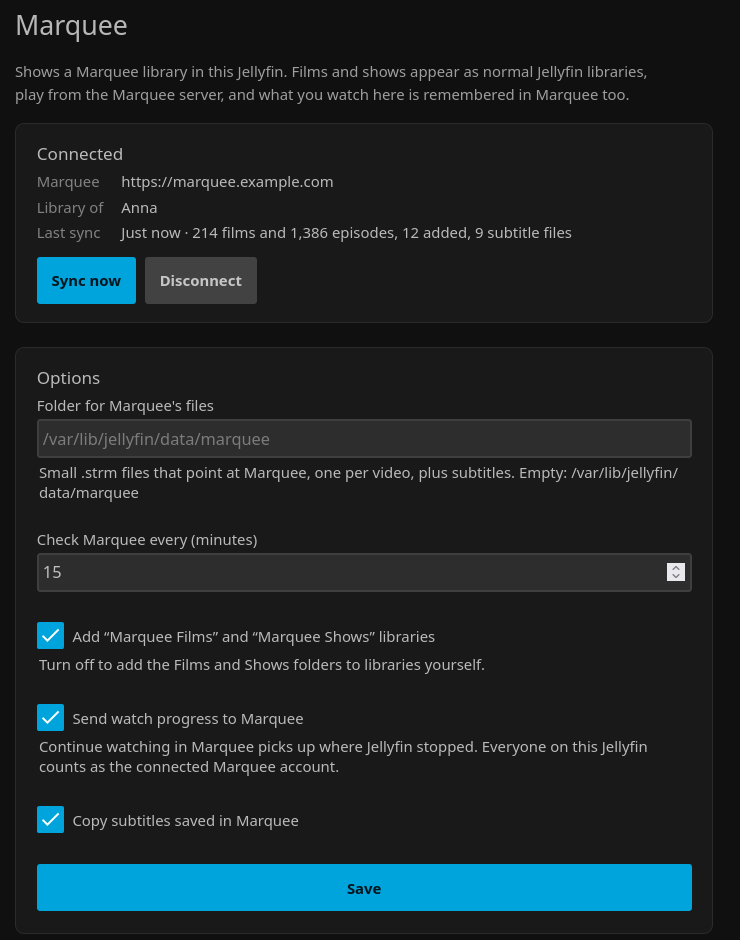
- Stays in step. Every 15 minutes (adjustable) new downloads appear and titles that left Marquee disappear. Videos Marquee converts to MP4 keep working.
- Subtitles. Subtitles saved in Marquee are copied beside each video, and fetched again for a couple of days after a download while Marquee fixes their timing.
- Progress goes back to Marquee. Watching in Jellyfin updates Continue watching in Marquee; finishing something clears it there.
- Your Jellyfin does the heavy lifting. If a device needs a different format, your Jellyfin server converts it, not the Marquee server.
- Safe links. Each
.strmfile holds a link signed for that one video. A leaked file opens one video, never the account, and disconnecting (in either place) kills every link at once. - Jellyfin 12 and 10.11. One plugin repository serves the right build to each.
Install
- In Jellyfin, open Dashboard → Plugins → Repositories (or the ⚙ on the Catalog page) and add a repository:
- Name:
Marquee - URL:
https://raw.githubusercontent.com/Tjabooo/jellyfin-plugin-marquee/main/manifest.json
- Name:
- Open the Catalog, find Marquee and install it.
- Restart Jellyfin.
Manual install: download the zip for your Jellyfin version from Releases (…12.zip for Jellyfin 12, …10.zip for 10.11), unzip it into a Marquee folder inside Jellyfin's plugins folder and restart Jellyfin.
Usage
- In Jellyfin, open Dashboard → Plugins → Marquee (also in the dashboard's side menu).
- Enter the address you open Marquee at, like
https://marquee.example.com, or the home-network address (http://192.168.1.10:8080) when Jellyfin is in the same house. A bare192.168.1.10:8080is fine too. - Press Get a code.
- In Marquee, open Settings, find Jellyfin and enter the code.
The plugin syncs straight away. Films and shows appear once Jellyfin has scanned them, usually within a minute or two. Sync now runs it again; Disconnect removes the library and its files from this Jellyfin.
In Marquee, Settings → Jellyfin lists every connected Jellyfin server with when it last synced, and Disconnect cuts one off.
Configuration
All on the plugin's settings page:
| Setting | Default | What it does |
|---|---|---|
| Folder for Marquee's files | Jellyfin's data folder + /marquee |
Where the .strm and subtitle files go. Changing it removes the files from the old folder. |
| Check Marquee every | 15 minutes | How often the library is synced (5 minutes to a day). Also under Dashboard → Scheduled Tasks → Marquee. |
| Add "Marquee Films" and "Marquee Shows" libraries | On | Turn off to add <folder>/Films and <folder>/Shows to libraries yourself. |
| Send watch progress to Marquee | On | Everyone on this Jellyfin counts as the connected Marquee account. |
| Copy subtitles saved in Marquee | On | Saves them beside each video as Name.<language>.srt. |
How it works
The plugin talks to Marquee's /c/jf/v1 API:
- Pairing.
POST /c/jf/v1/pair/startreturns a code and a secret poll id. Once someone signed in to Marquee enters the code,GET /c/jf/v1/pair/pollhands the plugin a key, exactly once. Marquee stores only a hash of it. - Library.
GET /c/jf/v1/library(with the key) lists that person's films and episodes with TMDB ids, saved subtitle languages and Continue watching positions. Each video comes with a stream path signed (HMAC) for that video and this connection. - Files. The plugin writes one
.strmfile per video and records what it wrote in.marquee-sync.json. Only files listed there are ever changed or deleted; anything else in the folder is left alone. Jellyfin is told about the folders that changed. - Playback. Jellyfin opens the signed URL like any network stream: seeking uses HTTP range requests, and Jellyfin converts the video if a device needs it.
- Progress. While something from Marquee plays, the position is sent to
POST /c/jf/v1/progressevery 30 seconds and when it stops; Jellyfin's "played" sends it as finished.
Everything lives under Marquee's /c/ path, which a Marquee behind Cloudflare Access already lets through without a Cloudflare sign-in (see Marquee's docs/remote-access.md); Marquee checks the key or the signature itself. It needs a Marquee recent enough to have Settings → Jellyfin.
Building
Needs the .NET 10 SDK.
dotnet build Jellyfin.Plugin.Marquee/Jellyfin.Plugin.Marquee.csproj -c Release   # net10.0 (Jellyfin 12) and net9.0 (10.11)
dotnet test Jellyfin.Plugin.Marquee.Tests
python3 scripts/package.py v0.1.0 --repo you/jellyfin-plugin-marquee            # dist/*.zip + manifest.json entries
Publishing a GitHub release does the packaging in CI, attaches the zips and updates manifest.json.
License
GPL-3.0, like Jellyfin, whose libraries the plugin builds on.