nadecue


Your CS2 grenade lineups on screen the moment you pull out the grenade, gone the moment you throw it.
Features
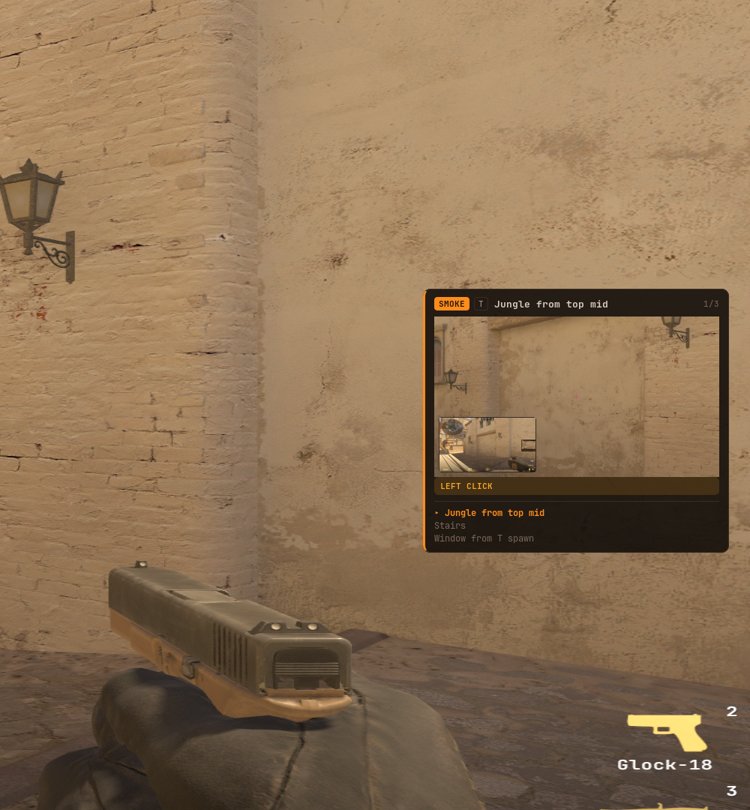
- Automatic. Hold a smoke on Mirage as T and the card shows your Mirage T smokes. Switch weapons or throw and it closes. Nothing is on screen the rest of the time.
- The right one first. The lineup you threw last time comes first (most players throw the same
ones for their role every round). The strip under the picture lists the rest;
nadecue nextsteps through them. - Ask for one by name.
nadecue find mirage ct smoke from t spawn(any word order, typos and speech-to-text spellings like "see tea" are fine) puts that lineup on the card now and first in line when you pull out the grenade. Made for voice assistants. - Save in one key press. In practice mode, stand on the spot, aim, hold the grenade and run
nadecue save. It stores a close-up of your crosshair (where to aim), the whole view (where you stand), the throw style, a name and an optional note. - Out of the way. A small card on the right edge of the screen, no keyboard focus, no clicks. It only exists while a grenade with saved lineups is in your hand.
- Bring a library.
nadecue importtakes a lineup pack (positions and view angles), andnadecue shootstands on every spot in your own CS2 and takes the aim pictures for you. Each lineup also gets a radar picture: where to stand, where it lands. - Plain files. One JSON file and two PNGs per lineup, one folder per map. Copy, share or edit them by hand.
- Fair play. It only reads Valve's Game State Integration (the same feed used by HUDs and Discord status tools) and takes screenshots. It never reads game memory or sends input to the game.
Install
Needs Linux on Wayland with eww (draws the card), grim (screenshots), rofi (naming lineups when saving), notify-send and Rust to build.
git clone https://github.com/Tjabooo/nadecue
cd nadecue
./install.sh
The installer builds the binary into ~/.local/bin, puts the card's eww config in
~/.config/nadecue/eww, writes ~/.config/nadecue/config.toml from the example and starts
nadecue.service. The daemon writes gamestate_integration_nadecue.cfg into CS2's cfg folder in
every Steam library it finds: restart CS2 once afterwards.
Bind two keys in your compositor. Hyprland (Lua config):
hl.bind("SUPER + ALT + U", hl.dsp.exec_cmd(os.getenv("HOME") .. "/.local/bin/nadecue next"))  -- lineups: show / next
hl.bind("SUPER + ALT + SHIFT + U", hl.dsp.exec_cmd(os.getenv("HOME") .. "/.local/bin/nadecue save"))  -- lineups: save this one
Classic hyprland.conf: bind = SUPER ALT, U, exec, nadecue next.
Usage
- Start a practice game (or any game), stand where the lineup starts, line up the throw and hold the grenade.
- Press your save key. Pick the throw style, type a name (Enter alone = "Smoke 4") and an optional "where to stand" note.
- In a match, pull out that grenade on that map: the card appears. Throw it and the card goes away.
| Command | What it does |
|---|---|
nadecue run |
The daemon (run by nadecue.service) |
nadecue next |
Card up: next lineup. Card down: browse this map's lineups for 15 s |
nadecue hide |
Hide the card until you switch grenades |
nadecue find WORDS |
Find a lineup by map, side, grenade and name in any order, show it and keep it first until thrown |
nadecue save |
Save where you stand and aim as a lineup (hold the grenade) |
nadecue forget |
Delete the lineup on the card |
nadecue preview MAP |
Show MAP's lineups without the game, e.g. nadecue preview de_mirage |
nadecue list [MAP] |
Print saved lineups |
nadecue import PACK.json [--prune] |
Add a lineup pack (a JSON array of lineups, format below); same id = update; --prune deletes lineups with an id that the pack no longer has (yours, without an id, stay) |
nadecue shoot [MAP..] [--all] |
Photograph every lineup that has pos + ang but no picture yet, in CS2 |
nadecue radar |
Redraw every radar picture |
nadecue cfg |
Reinstall CS2's game state config |
Lineup packs and pictures
A pack is a JSON array of lineups. With pos (setpos x y z) and ang (setang pitch yaw) nadecue can
take the pictures itself:
- Add
-netconport 2121to CS2's launch options (CS2's text console over TCP; it listens on all interfaces, so keep a firewall up and remove the option afterwards). - Start CS2 (offline with bots is fine) and run
nadecue shoot. For each map it loads the map, turns onsv_cheats, hides the HUD and viewmodel, then for each lineup runssetpos/setang, waitsshoot_settle_msand takes the screenshot. Everything is put back at the end.
Radar pictures need the map's radar image and overview file (Valve's <map>.txt with pos_x,
pos_y and scale) as $XDG_DATA_HOME/nadecue/radar/<map>.png + <map>.txt; the lineup's to
(x, y) is where it lands.
Voice
nadecue find takes whatever was said. Map (mirage, dust two...), grenade (smoke, flash,
molly, HE) and filler words are pulled out; the rest is matched loosely against lineup names and
notes, and the side counts too. "smoke t spawn ct mirage", "mirage ct smoke from t spawn" and "CT from
T spawn smoke" all find the lineup named CT from T spawn. Without a map word it uses the map you're
on. Point your voice assistant's "smoke/flash/ ..." phrases at nadecue find <what was said>;
the reply (the lineup's name, or what didn't match) is printed.
When word matching isn't sure (several lineups score alike, or some words fit none), find asks a
language model with a prompt made for this: the numbered lineups for that map and grenade, plus what
CS2 callouts and speech-to-text mistakes look like. Any OpenAI-compatible endpoint over plain HTTP
works (llama.cpp, Ollama, LM Studio); set llm_url and llm_model. Without one, the best word match wins.
Configuration
~/.config/nadecue/config.toml (see config.example.toml):
| Key | Default | Meaning |
|---|---|---|
port |
3714 |
Port CS2 posts game state to |
output |
all | Output grim screenshots when saving (e.g. "DP-1") |
screen |
eww default | Screen for the card (eww open --screen; eww uses the monitor model name) |
radius_m |
30 |
When positions are known: only lineups this close |
browse_secs |
15 |
How long the browse card stays up |
throws |
7 styles | Throw styles offered when saving |
netcon_port |
2121 |
CS2 console port for shoot |
shoot_settle_ms |
700 |
Wait after each teleport before the picture |
llm_url |
none | http://host:port of an OpenAI-compatible server for find |
llm_model |
none | Model name sent to it |
llm_extra |
none | JSON merged into the request, e.g. {"chat_template_kwargs": {"enable_thinking": false}} |
llm_timeout_secs |
15 |
Give up on the model after this long |
The card's look lives in ~/.config/nadecue/eww/eww.scss (re-running install.sh overwrites it).
Lineups are stored in $XDG_DATA_HOME/nadecue/lineups/<map>/ (NADECUE_DIR overrides it):
{
  "id": "my-pack:mirage-window",
  "name": "Window from T spawn",
  "map": "de_mirage",
  "kind": "smoke",
  "side": "T",
  "throw": "Jump throw",
  "image": "window-from-t-spawn.png",
  "view": "window-from-t-spawn.view.png",
  "note": "Corner by the barrels",
  "pos": [1216.0, -640.0, -159.97],
  "ang": [-37.5, 150.2],
  "to": [-700.0, -650.0]
}
kind is smoke, flash, he, molotov (incendiaries too) or decoy; an empty side fits both
teams. pos, ang and to are optional: they let shoot take the pictures and draw the radar. When
CS2 reports your position (spectating) and a lineup has pos, the card also shows an arrow and
distance to the spot and how far off your aim is.
How it works
- CS2 posts game state to
127.0.0.1:3714(no buffer, 50 ms throttle). nadecue reads the map, your side, health and weapons: a grenade with"state": "active"is in your hand, and the grenade count dropping means you threw it. - On a throw, the lineup on the card is marked as used (
$XDG_STATE_HOME/nadecue/used.json) so it comes first next time. - The card is an eww window on the overlay layer. nadecue updates only the variables that changed and closes the window whenever there's nothing to show.
- Positions: CS2 only includes
player.position/forwardwhen you spectate, not while you play, andgetposis a cheat command. So in real matches lineups are picked by map, grenade, side and what you threw last, not by where you stand. findscores each lineup: +1 per request word found in its name or note (prefix, plural or one typo away counts), +0.5 when the word is its side, -0.2 per word that fits nothing.- The card shows the aim picture with the radar (or, for lineups you saved yourself, the whole view) in the corner.
- Debugging:
NADECUE_DUMP=/tmp/gsi.json nadecue runwrites every game state post to that file.
License
MIT