dotfiles · unit-01 (laptop)
Hyprland rice for an ASUS Zenbook S 16 (Ryzen AI 9 HX 370 / Radeon 890M), "midnight neon" palette.
The desktop lives in Tjabooo/dotfiles-desktop ("ember"); this one is for media + development.
Layout
| repo path | goes to |
|---|---|
alacritty/ dunst/ fastfetch/ hypr/ mpv/ neon/ npukit/ nvim/ ohmyposh/ pacman/ satty/ systemd/ rofi/ waybar/ wireplumber/ zed/ |
~/.config/<same> |
vesktop/themes/ |
~/.config/vesktop/themes/ (Vesktop) and ~/.config/Vencord/themes/ (Discord + Vencord) |
mimeapps.list |
~/.config/mimeapps.list |
homedir/.zshrc .bashrc .bash_profile |
~/ |
homedir/.local/bin/neon-*, homedir/.local/bin/codex, homedir/.local/bin/clipdeck, homedir/.local/bin/screen-awake |
~/.local/bin/ |
homedir/.local/share/neon/ |
~/.local/share/neon/ (system-fixes.sh, GRUB theme builder, 10_neon source) |
system/etc/…, system/usr/local/bin/… |
the same paths under / (root-owned; copy with sudo) |
Look: the deck style
Everything shares the look of the eww overlays (neon/eww): square panels, a 3px violet bar on
top, small bold uppercase tags in dim grey, solid violet "key" chips, and hover/selection shown as
the panel colour plus a 3px accent edge on the left.
- Waybar: three square islands; workspaces are key chips (violet = active, line grey = has windows);
modules read
CPU 3% BRT 40% VOL 42% NET … BAT 80%; the date sits next to the clock as a tag (custom/date, because Waybar's clock can't uppercase). Tooltips and tray menus are small decks. - rofi (
rofi/deck.rasi,power.rasi,actions.rasifor dunst's action picker). - dunst: square, 1px frame (violet normal, pink critical), app name as a violet tag above the title.
- hyprlock: the password field sits in a deck card (
LOCKED HOSTNAME, key hints underneath). - Hyprland: square windows, solid violet border on the focused one.
- Discord (
vesktop/themes/neon.theme.css): square panels, solid violet home chip.
How the session starts
hypr/hyprland.lua (Hyprland 0.55+ Lua config) runs systemctl --user restart neon-session.target
on start and stops it on shutdown. That target BindsTo=graphical-session.target and pulls in
waybar, dunst, hypridle, hyprpaper, cliphist, hyprpolkitagent and neon-power as normal user
units, so they restart when they crash and log to journalctl --user -u <name>.
(hypr/autostart is the old launcher script and is no longer used.)
Laptop extras
- neon-power: on plug / unplug it reloads Hyprland;
hyprland.luareadsAC0/onlinewhen it loads → 120 Hz + full blur/shadows on AC, 60 Hz + light blur on battery. Low-battery notifications at 15 % and 7 %. - Waybar wake eye: click to keep screens awake (no automatic dim, lock, OLED blanking or idle suspend).
Click again for normal idle. Uses
screen-awake.service; survives bar restarts and resets at logout. Manual lock, suspend and lid handling keep working. - hypridle: dim (restores your brightness) → lock → screen off → suspend on battery only.
- neon-osd: volume / brightness / mic keys with an on-screen bar (dunst).
- neon-shot: Print-key screenshots via hyprshot → satty;
SUPER+Printre-edits the last one. - neon-update (
update): Arch news →yay -Syu→ .pacnew → orphans → reboot hint. - neon-keys (
SUPER+/): the desktop's keybind overlay (eww,neon/eww/), built live from the-- commentson the binds in hyprland.lua; Esc / Enter /SUPER+/close it.keysprints it in the terminal. - Power menu (
SUPER+Escape) shows all six entries without scrolling and can do a one-shot reboot into Windows (GRUB or systemd-boot, whichever booted). - House dot (waybar
custom/house): home server health from Marquee's House tab viamarquee-house(lives in the marquee repo,agents/); hidden away from home or when not installed.
NPU tools (npukit)
The Ryzen AI NPU does real work through npukit (FastFlowLM underneath):
install it from its repo (./install.sh); npukit/config.toml here is this laptop's config (aliases, search roots,
VS Code as the opener).
SUPER+ALT+Ddictate (press, talk, press again → typed + copied),SUPER+SHIFT+Printregion → text,SUPER+ALT+Ssemantic search over~/workspace,~/Documentsand the agent-mesh memory,SUPER+ALT+NNPU menu.- Waybar
custom/npu: dimNPU= nothing loaded, model name = loaded, pink edge = working, red chip = recording. Signal-driven (RTMIN+16 from the gateway), no polling. Click: menu, right-click: unload. - Typing dictated text needs
wtype(pacman -S wtype); without it the text only lands on the clipboard. - FastFlowLM is pinned to the upstream 1.0.12 tarball in
~/.local/share/fastflowlm/1.0.12/([server] flminnpukit/config.toml): Arch's 1.0.11 returns wrong embedding vectors and stalls the NPU. Drop the pin oncepacman -Q fastflowlmshows 1.0.12+.
Clipboard history across the home network
SUPER+V opens clipdeck in the neon overlay. Its three columns show this
machine’s cliphist history, the other Arch machine’s history, and native Windows
clipboard history, newest first. Press an entry’s displayed key or click it to
copy it here; Escape closes the picker. Windows history starts collecting items
when enabled in Windows Settings → System → Clipboard. If it is empty, disabled,
or unavailable, the column shows the current Windows clipboard and says why.
Selecting an older Windows item leaves Windows’ current clipboard unchanged.
homedir/.local/bin/clipdeck launches the separately installed Archfleet helper
at ~/.local/share/archfleet/clipdeck.py. Archfleet (with clipdeck and its Windows desktop
bridge) is its own repo, Tjabooo/archfleet: update both
Arch machines with git pull && ./install.sh from a clone. The helper uses existing SSH aliases
and the same-user Windows named pipe, without another network listener or cloud sync.
The overlay stores only its visible previews temporarily in the private runtime
directory while open. Clipboard contents and credentials stay out of this repo.
Discord / Vesktop theme
vesktop/themes/neon.theme.css adapts the desktop's Ember layout to this laptop's
midnight neon palette: navy panels, violet/pink accents, lavender text, JetBrainsMono
and 12px panel corners. It uses midnight by refact0r
as its base; the laptop currently runs Discord with Vencord.
mkdir -p ~/.config/vesktop/themes ~/.config/Vencord/themes
cp vesktop/themes/neon.theme.css ~/.config/vesktop/themes/
cp vesktop/themes/neon.theme.css ~/.config/Vencord/themes/
In Discord/Vesktop, select Dark appearance and enable midnight neon under Settings → Vencord → Themes → Local Themes. Only the theme is versioned here; keep account and plugin settings local. Hyprland already provides window opacity/blur.
Codex over SSH
homedir/.local/bin/codex exposes the desktop app's bundled CLI from
/usr/lib/chatgpt/resources/codex to SSH login shells. Install the desktop app,
copy the launcher to ~/.local/bin/, and sign in once through the app.
Verify with ssh arch-laptop 'PATH="$HOME/.local/bin:$PATH"; codex --version'.
The home network's Windows host uses the separate home-server-codex SSH alias;
its compatibility bridge is maintained in home-network/codex-remote on home-server.
SSH keys and account credentials stay outside this repository.
Boot: GRUB + Secure Boot (sbctl, no shim)
The firmware trusts only the sbctl key (no Microsoft CA), so there's no shim/MOK like on the desktop: GRUB itself is signed with the sbctl key.
system/usr/local/bin/grub-install-signed: grub-install with every module built in (Secure Boot lockdown can't load modules from disk), sbctl sign, grub-mkconfig. Run again bysystem/etc/pacman.d/hooks/90-grub-signed.hookon every grub upgrade; sbctl's own hook re-signs kernels.- Menu = Arch Linux · Windows 11 · UEFI Firmware Settings.
system/etc/grub.d/10_neonreplaces the stock10_linux(which always adds "Advanced options");NoExtract = etc/grub.d/10_linuxin pacman.conf keeps upgrades from bringing it back. It only knows the stocklinuxkernel: add an entry there if you install another one. - Windows chainloads the sbctl-signed copy at
/EFI/WindowsChain/bootmgfw.efi(Microsoft's own loader would be refused). os-prober is off. - Theme "magi-neon":
homedir/.local/share/neon/grub-theme/build.py(sibling of the desktop's ember "magi" theme, midnight neon, drawn for 2880x1800). The left half is the EVA unit-01 activation board: sync-ratio ring (初号機, 41.3 %), ENTRY PLUG / LCL / A10 NERVE / UMBILICAL status units, harmonics traces. See the boot sequence below for how to install it. grub-promote.service: one-shot, moved GRUB to the front of the firmware boot order after its first successful boot (done; it disabled itself). systemd-boot stays installed as the fallback.
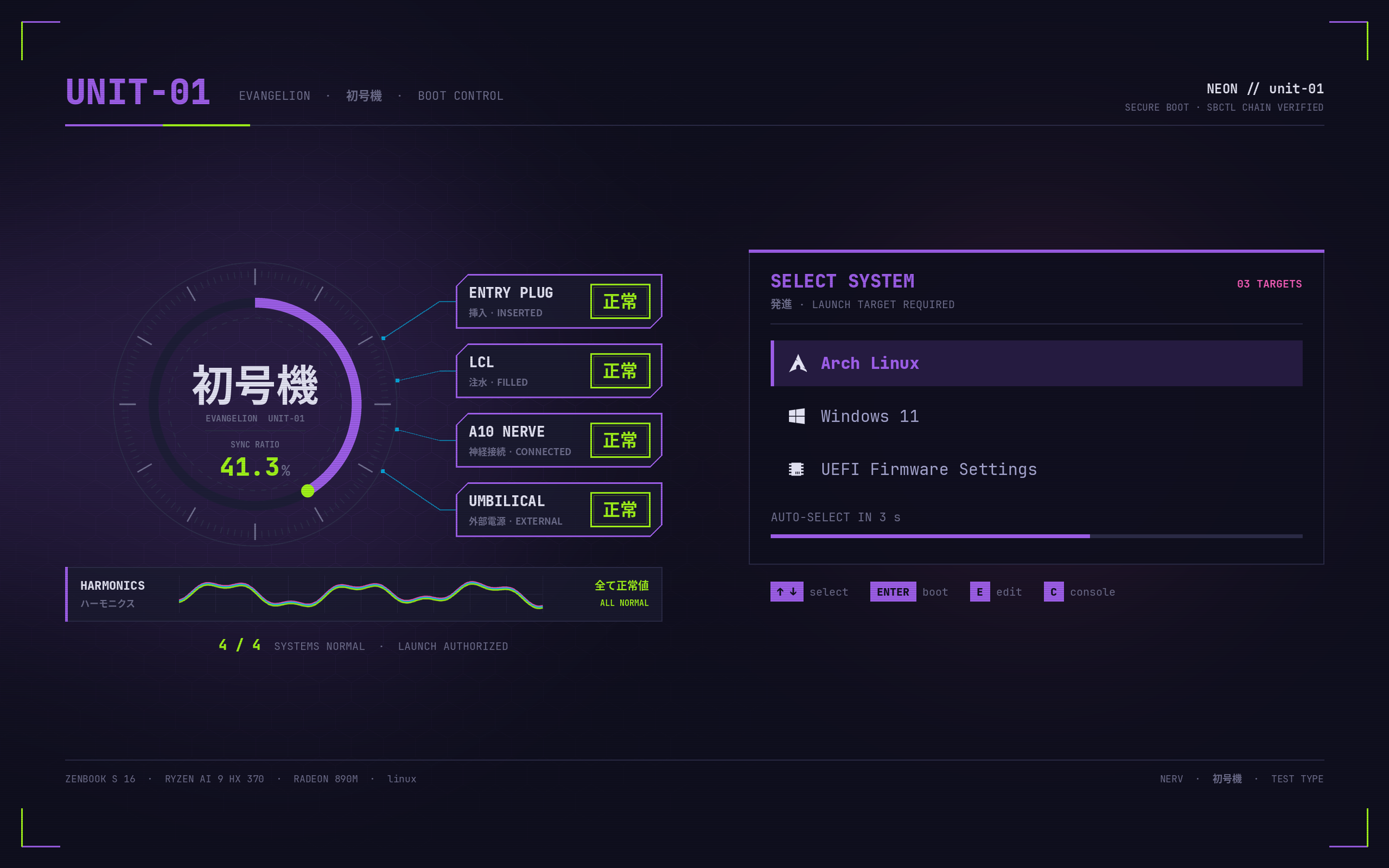
Boot sequence: unit-01 activation
One continuous animation from firmware to desktop, the laptop's version of the desktop's MAGI boot. Every stage starts on the exact pixels the previous one ended on.
- GRUB intro (
grub-theme/intro.py, ~6.5 s): the board powers up before the menu: the frame draws in, the card opens on 起動 ACTIVATION, the sync ring sweeps in, ENTRY PLUG → LCL → A10 NERVE → UMBILICAL each flash solid green 起動 and stamp 正常 while the sync ratio climbs, the harmonics lock together at 41.3 %, and the card becomes the boot menu. GRUB flips 28 full-screen PNGs (background_image+clear, silentplaynotes as millisecond pauses). Hold Shift to skip it; any key fast-forwards. - Plymouth splash "unit01" (
plymouth-theme/build.py, ~18 s): frame 0 is GRUB's background. A launch log fills the empty card, the board fades out, and a NERV emblem builds (leaf wipe with a green edge, NERV flicker). Then 逃げちゃダメだ is typed three times, followed by "I mustn't run away.". After that comes a synchronization test: the pilottjabois typed, the sync ratio climbs to 41.3 %, LCL / A10 NERVE / HARMONICS go 正常, and the panel reads EVA-01 ACTIVATED. The unit-01 art (hypr/wallpapers/eva_lock4.jpg, also the lock screen) rises behind "WELCOME, TJABO / おかえりなさい · 発進", and everything fades to #0f0f1e.unit01-splash-hold.serviceholds the boot until the animation has finished. - Handoff (
hypr/scripts/unit01-handoff.py): tty1 autologs in and execs Hyprland, which starts on the same #0f0f1e. An overlay plays the 接続 UNIT-01 SESSION LINK. The power chip reads the battery: 外部 on AC; on battery it shows 内部 and the time left as the Eva's ACTIVE TIME. Then it runs hyprlock, so the laptop still asks for the password, and after the unlock it dissolves hex by hex into the desktop.
Install (build as your user, then the two installers; both back up what they change to
/var/backups/unit01-boot/ and can undo):
cd ~/.local/share/neon/grub-theme && python3 build.py && python3 intro.py && sudo ./install.sh
cd ../plymouth-theme && python3 build.py && sudo ./install.sh
cat zprofile-tty1.zsh >> ~/.zprofile # tty1 execs start-hyprland- The GRUB installer copies the theme to
/boot/grub/themes/magi-neon, writes/etc/grub.d/05_unit01_introand drops the "Loading …" echoes from10_neon.--no-introremoves the intro. - The Plymouth installer adds the
plymouthpackage and the theme. It also addsplymouthaftersystemdin the mkinitcpio HOOKS, plussplashand a neon console palette (vt.default_*, colour 0 = #0f0f1e) on the kernel command line. Finally it sets up the tty1 autologin drop-in and the hold service.--removeundoes all of it. - Nothing new goes into the signed
grubx64.efi: png, play, gfxterm_background, keystatus and configfile are already ingrub-install-signed's module list. - Check the timing after a boot with
journalctl -b -u unit01-splash-hold.
Install on a fresh machine
for d in alacritty dunst fastfetch hypr mpv neon ohmyposh pacman rofi satty systemd waybar zed; do
  mkdir -p ~/.config/$d && cp -r $d/. ~/.config/$d/
done
cp mimeapps.list ~/.config/
cp -r homedir/. ~/
systemctl --user daemon-reload
# packages the config expects:
sudo pacman -S --needed hyprland hyprlock hypridle hyprpaper hyprshot hyprpolkitagent \
  xdg-desktop-portal-hyprland waybar dunst rofi satty cliphist wl-clipboard brightnessctl \
  playerctl pacman-contrib zoxide pkgfile alacritty kitty yazi mpv ttf-jetbrains-mono-nerd jq
yay -S eww   # keybind overlay (AUR)