deckskin


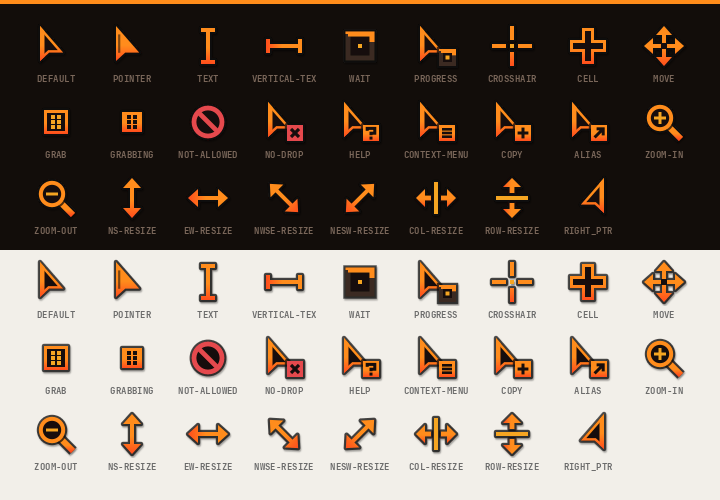
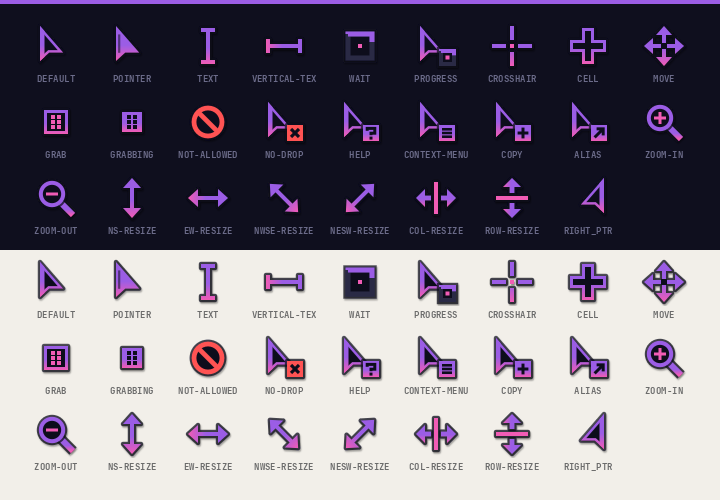
Turn a small palette file into a matching mouse cursor theme (Xcursor + hyprcursor) and Firefox theme, both in a flat, square "deck" style: dark panels, a 3px accent bar on top, solid accent chips.

Features
- Cursor theme with 26 shapes and 95 aliases (CSS names, X11 names, the Qt/GTK hash names), so apps
don't fall back to another theme.
- The default arrow is a dark wedge with an accent outline and a thicker accent bar down its straight edge.
Link hover turns it into a solid accent "chip".
waitandprogressanimate a segment running round a square track. - Built as Xcursor (sizes 24–96, for XWayland, GTK and Qt) and hyprcursor (SVG, sharp at any scale on Hyprland), in one theme folder.
- A halo and a soft shadow keep every shape readable on light pages and on accent-coloured UI.
- The default arrow is a dark wedge with an accent outline and a thicker accent bar down its straight edge.
Link hover turns it into a solid accent "chip".
- Firefox theme (
userChrome.css+userContent.css, works on release Firefox without signing):- Tabs: the selected tab is a panel with a 3px accent bar on top and runs straight into the nav bar.
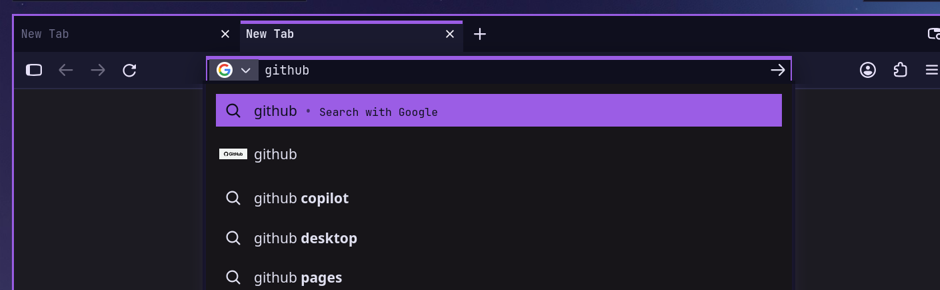
- Square address bar; the selected result is a solid accent row and hovered results get an accent left edge.
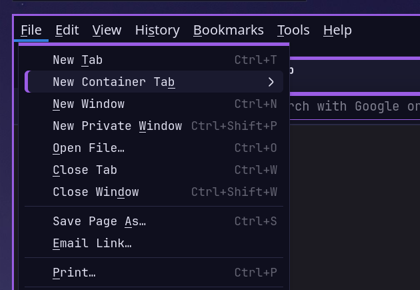
- Menus and panels get a 3px accent bar on top, with an accent left edge on hover. Tooltips, the link status bar, the find bar and the sidebar are styled too.
- New tab page,
about:pages (settings, add-ons) and reader view use the palette. - Text selection uses the accent colour, and the dark background removes the white flash while pages load.
- One palette per rice. Each palette is a TOML file with eleven colours and a font. Two ship with deckskin:
ember(charcoal + orange) andneon(navy + violet/pink).
Requirements
- Python 3.11+ with Pillow (
python-pillow) rsvg-convert(librsvg)hyprcursor-util(hyprcursor) for the hyprcursor build. If it's missing, you get Xcursor only.- Firefox, any recent release (tested on 159)
Install
git clone https://github.com/Tjabooo/deckskin && cd deckskin
./deckskin install ember                    # cursor + Firefox theme
./deckskin install neon --cursor            # just the cursor
./deckskin install ember --firefox --restart-firefox
install does the following:
| Part | Where |
|---|---|
| Cursor theme | ~/.local/share/icons/<Name>-Deck/ (Xcursor cursors/ + hyprcursors/) |
| Default cursor for X11/XWayland | ~/.icons/default/index.theme, ~/.local/share/icons/default/index.theme |
| GTK | gtk-cursor-theme-name/size in ~/.config/gtk-{3,4}.0/settings.ini, gsettings cursor-theme/size |
| Session | XCURSOR_*/HYPRCURSOR_* pushed to systemd + D-Bus activation env; hyprctl setcursor when on Hyprland |
| Firefox | chrome/userChrome.css + chrome/userContent.css in your default profile, a marked block in user.js |
To keep the cursor after a re-login, set it in your compositor config. For Hyprland:
hl.env("XCURSOR_THEME", "Ember-Deck")
hl.env("HYPRCURSOR_THEME", "Ember-Deck")
(or env = XCURSOR_THEME,Ember-Deck / env = HYPRCURSOR_THEME,Ember-Deck in hyprland.conf).
Apps that are already open keep their old cursor until they restart.
Firefox loads the theme only at startup. With --restart-firefox, deckskin closes Firefox gracefully,
switches the base theme to the built-in Dark one and starts it again. Your tabs come back even if Firefox
normally opens to the home page. Without the flag, just restart Firefox yourself.
Before anything gets overwritten, a copy goes to ~/.local/share/deckskin/backups/.
Usage
./deckskin build ember --out dist           # build everything into dist/ember/ without installing
./deckskin preview neon --out neon.png # cursor contact sheetConfiguration: make your own palette
Copy palettes/ember.toml, change the colours, and pass either its name (if it sits in palettes/) or its path:
name = "Ember"            # theme becomes "Ember-Deck"

[colors]
bg        = "#120d0a"     # window / page background
panel     = "#1b1410"     # raised surfaces: nav bar, selected tab, hover
line      = "#3a2c22"     # 1px borders, spinner track
fg        = "#d8cbbf"     # text
subtext   = "#b2a397"     # secondary text
dim       = "#7a675a"     # labels, inactive tabs
accent    = "#ff8c1a"     # 3px bars, chips, cursor outline
accent2   = "#f5a524"     # highlights, cursor details
deep      = "#ff4d1f"     # gradient end
alert     = "#e5484d"     # not-allowed / no-drop
on_accent = "#120d0a"     # text on a solid accent chip

[font]
ui = "JetBrainsMono Nerd Font" # Firefox tabs, address bar, menusHow it works
deckskin_cursor.pydraws each shape as SVG on a 24-unit grid, so edges land on whole pixels at 24 px.rsvg-convertrenders every size. The Xcursor files are written directly (premultiplied ARGB with an image per size/frame, aliases as symlinks), and the same SVGs plus ameta.hlper shape go throughhyprcursor-util --create.deckskin_firefox.pyfills a CSS template with the palette. It mostly overrides Firefox's own CSS variables (--panel-background-color,--urlbar-border-radius,--tab-selected-bgcolor, …) as!importantuser styles, which beat the inline values lightweight themes set. Firefox ignores::part(content)from user sheets, so the accent bar on menus comes in as a background layer instead.- Changing the base theme edits
extensions.jsonandprefs.jswhile Firefox is closed. The addon startup cache gets deleted, and Firefox rebuilds it.
Uninstall
rm -r ~/.local/share/icons/*-Deck
# then remove chrome/userChrome.css, chrome/userContent.css and the "deckskin" block in user.js
# from your Firefox profile, or restore them from ~/.local/share/deckskin/backups/License
MIT