ember-pad


A LAN touch deck for an old tablet next to your desk: Discord, OBS scenes, audio buses, clips and a CS2 bomb timer, served by one small Rust binary to a page that still runs on an iPad mini with iOS 9.
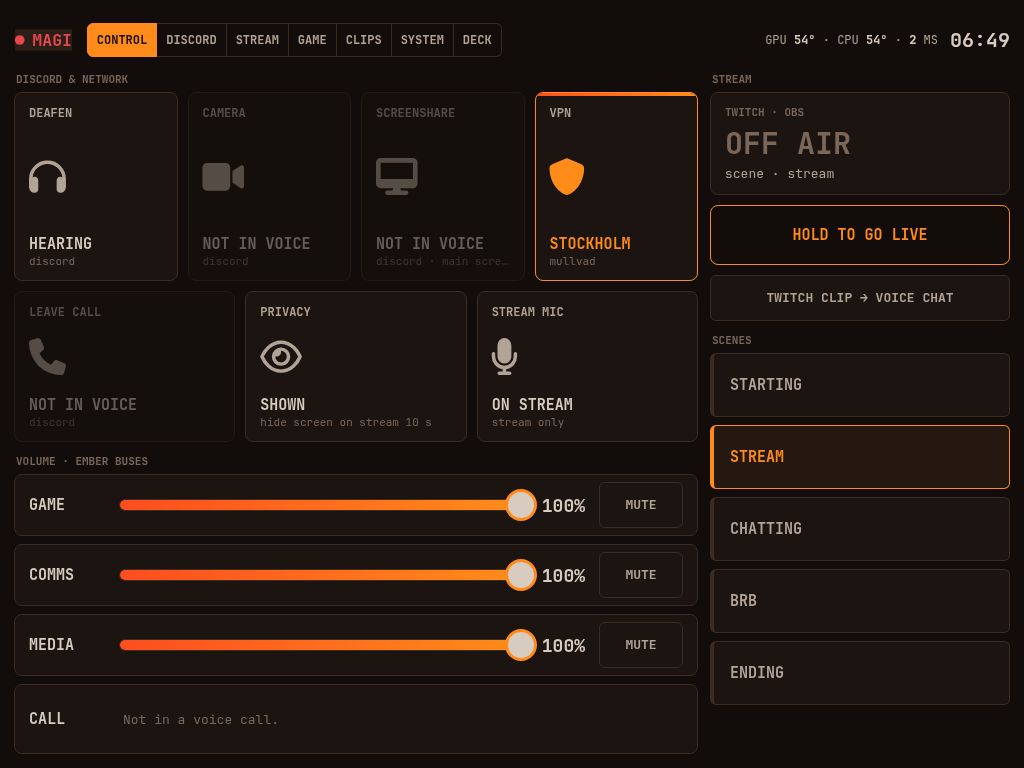
Most people put a Stream Deck there. This puts a cracked iPad there instead: an always-on page in Safari (Add to Home Screen + Guided Access), driven by a user service on a Hyprland desktop. It is the deck for the EMBER/MAGI desktop tools, so several tiles call those tools; anything it can't reach is shown greyed out instead of breaking the page.
Features
- CONTROL: Discord deafen / camera / screenshare / leave call, VPN, stream privacy and stream mic, audio bus sliders, a call row with every person's avatar (per-person volume 0-200 %, local mute, soundboard mute).
- DISCORD: hop between voice channels, people in your channel with local volume, soundboard, online status and custom status quick picks.
- STREAM: stream health, hold-to-go-live / end, OBS scene buttons, Twitch clip straight into the voice chat (through magi-overlay).
- GAME: CS2 card (score, round, bomb), Leetify stats, live performance from the MangoHud CSV log.
- CLIPS: recent clips with thumbnails: keep, trash, or SEND (uploads a share copy into the voice channel's text chat).
- SYSTEM: volume and mute per PipeWire bus. DECK: your own buttons from a
deck.toml. - Overlays: a full-screen CS2 bomb timer (exact, from its own game state integration feed), a match-found flash, and an idle clock with the current song when you're away.
- Live state without polling forks: a long-running
pactl subscribewatcher, state files, and one long poll for the bomb timer.
Install
Needs Rust 1.85+, PipeWire (pactl) and Hyprland (hyprctl) on the desktop.
git clone https://github.com/Tjabooo/ember-pad && cd ember-pad
./install.sh                                  # builds, installs ~/.local/bin/ember-pad, adds the user unit
systemctl --user enable --now ember-pad
ember-pad url                                 # open this address on the tablet
If a firewall runs on the desktop, allow the tablet only, for example sudo ufw allow from <tablet-ip> to any port 7790 proto tcp.
On the tablet: open the URL, Share → Add to Home Screen, then start it from the home screen (full screen, no browser bars). Guided Access and Auto-Lock off keep it on the deck.
Usage
ember-pad [serve]   run the HTTP server (what the service does)
ember-pad url       print the tablet URL, including the access key
Discord tiles need Discord started with --remote-debugging-port=9223 (bound to loopback). Without it they show "discord offline".
For the exact bomb timer, add a CS2 game state integration file (csgo/cfg/gamestate_integration_ember_pad.cfg) that posts to http://127.0.0.1:7790/gsi with buffer 0, throttle 0 and your pad key as the auth token, then restart CS2.
Configuration
~/.config/ember/pad.toml, every key optional. See pad.example.toml:
| Key | Default | What |
|---|---|---|
bind |
0.0.0.0:7790 |
listen address |
discord_port |
9223 |
Discord's DevTools port |
overlay |
127.0.0.1:7788 |
magi-overlay (OBS, stream health, CS2) |
scenes |
5 names | OBS scene buttons |
share_screen / side_screen |
first / second monitor | Hyprland outputs for Go Live |
mic |
@DEFAULT_SOURCE@ |
the source the mic state follows |
custom_statuses |
3 lines | custom status quick picks |
The access key lives in ~/.config/ember/pad.key (created with mode 0600 on first start). The DECK tab reads [[action]] entries (label, run) from ~/.config/ember/deck.toml.
Tiles that call other tools: ember (mic, mix, mode), ember-vpn, ember-clip / clip-save (clips), wlopm, grim, wl-copy, Mullvad. The audio bus sliders expect PipeWire sinks named ember_game, ember_comms, ember_media and ember_fx.
How it works
- One thread-per-connection HTTP server (std only). Every route needs the key (query
k, headerX-Pad-Keyor thepadcookie) and a private-network peer address. GET /api/statereturns everything the page shows; the page polls it about once a second and keeps an NTP-style clock offset from the fastest round trip, so the bomb timer counts down in the desktop's time.- Discord is driven over the Chromium DevTools protocol:
discord.jsis injected into the client and clicks the same buttons you would (by aria label), reads voice state from Discord's own stores, and uploads clips through a hidden file input. - The page is ES5 with no
fetch, grid or arrow functions, because Safari 9 is the target.
License
MIT